
Download CSViewer – Free Windows Database Viewer, Secure & Easy
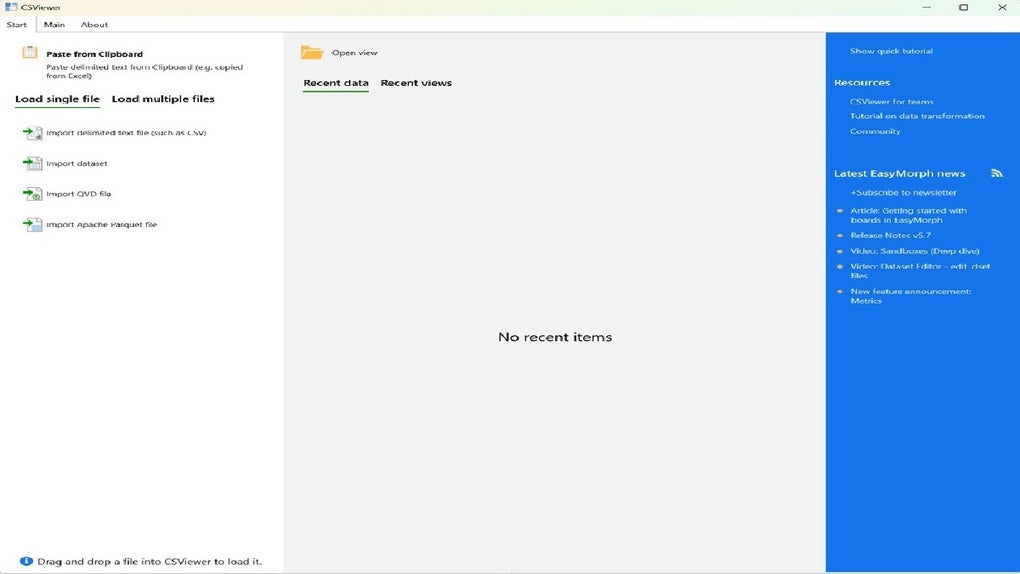
CSViewer, crafted by the developers behind EasyMorph, is a free Windows‑only software that brings a refreshingly simple approach to opening, browsing, and analysing database files. Whether you work with SQLite, Microsoft Access, or generic SQL dump files, CSViewer eliminates the need for heavyweight database management systems or complex configuration steps. Its clean, drag‑and‑drop interface lets beginners explore table structures, run quick queries, and export data without any steep learning curve.
For seasoned DBAs, CSViewer acts as a lightweight companion tool for rapid checks, schema validation, or data inspection while keeping the main development environment untouched. The application stays true to the “view‑only” philosophy – you can explore, filter, and sort records securely, but editing capabilities are deliberately limited to preserve data integrity. In short, CSViewer offers a secure, free, and instantly accessible way to interact with database files on Windows, making it an indispensable addition to any data‑driven workflow.
Key Features of CSViewer
- Supports multiple database formats: SQLite, Microsoft Access (.mdb, .accdb), CSV, and generic SQL scripts.
- Instant file preview – open a database with a single click, no installation of drivers required.
- Search, filter, and sort data within tables using a familiar spreadsheet‑like UI.
- Export selected tables or query results to CSV, Excel, or JSON for downstream processing.
- Built‑in query console for ad‑hoc SQL statements; results are displayed in a sortable grid.
- Dark and light themes to match your Windows preferences and reduce eye strain.
- Automatic detection of primary keys and foreign‑key relationships for easy navigation.
- Lightweight footprint (under 30 MB) ensures fast start‑up and minimal impact on system resources.
- Secure, read‑only mode guarantees that the original database file remains untouched during analysis.
- Regular free updates from EasyMorph, including bug fixes and compatibility patches.
Installation & Usage Instructions
Getting CSViewer up and running is intentionally straightforward. Follow these steps to start viewing your databases within minutes:
- Download the installer: Visit the official EasyMorph website or a trusted software repository and click the “Download CSViewer” button. The file is a standard Windows executable (CSViewer‑Setup.exe) and is digitally signed for security.
- Run the installer: Double‑click the downloaded file. Windows will prompt you to
confirm that you want to allow the program to make changes; click “Yes”. The wizard guides you
through the license agreement, destination folder (default is
C:\Program Files\CSViewer), and optional desktop shortcut creation. - Complete installation: After a brief extraction, the installer finishes with a “Finish” button. You can launch CSViewer immediately by checking “Launch CSViewer” or start it later from the Start menu.
- Open a database file: Drag a supported file onto the CSViewer window or use
File → Openfrom the menu. CSViewer instantly reads the schema and populates the left navigation pane with table names. - Explore data: Click any table to view its contents in the main grid. Use the
search box above the grid to filter rows, or click column headers to sort. For deeper analysis,
open the “SQL Console” (found under
Tools) and type a query such asSELECT * FROM Customers WHERE Country='Germany'. Results appear in the same sortable grid. - Export results: Right‑click the grid or use the
Exportbutton to save the current view as CSV, Excel, or JSON. This makes it easy to hand off data to colleagues or import it into other tools. - Update the software: CSViewer checks for updates at startup. If a newer version is available, you’ll receive a non‑intrusive notification with a direct download link.
The entire process is designed to be frictionless, allowing you to focus on data rather than configuration. Because CSViewer runs in a sandboxed, read‑only mode, you can safely open sensitive files on shared or public machines without risking accidental modifications.
Compatibility, Pros and Cons
CSViewer is built exclusively for the Windows ecosystem, supporting Windows 10, Windows 11, and legacy Windows 7 (with SP1). The application leverages native .NET libraries, ensuring smooth integration with the OS and consistent performance across different hardware configurations. While it does not currently have macOS or Linux versions, the low resource usage means you can run it inside a Windows virtual machine on those platforms if needed.
Pros
- Free & Secure: No hidden fees, no trial periods, and a read‑only design protects data integrity.
- Lightning‑fast startup: The lightweight installer launches within seconds.
- Broad format support: Handles the most common database file types without extra drivers.
- User‑friendly UI: Minimal learning curve, ideal for both beginners and power users.
- Export flexibility: Direct output to CSV, Excel, or JSON streamlines downstream workflows.
- Regular updates: EasyMorph provides free patches, ensuring compatibility with newer Windows releases.
Cons
- No editing capabilities: CSViewer is view‑only; users needing data entry must rely on other tools.
- Windows‑only: No native macOS, Linux, Android, or iOS versions are available.
- Limited advanced analytics: Features like stored procedures, triggers, or visual query builders are absent.
- Basic UI customization: Theme options are limited to light/dark; no extensive layout tweaks.
Frequently Asked Questions about CSViewer
Is CSViewer really free or does it contain hidden costs?
CSViewer is completely free. EasyMorph offers it as a standalone tool with no trial periods, subscription fees, or hidden in‑app purchases. All updates are also provided at no charge.
Can I open encrypted or password‑protected databases with CSViewer?
CSViewer can read password‑protected Access files if you supply the correct password when prompted. However, it does not support decryption of encrypted SQLite databases; those must be unlocked before loading.
Does CSViewer modify any data during the viewing process?
No. The application operates in read‑only mode by default, ensuring that the original database file remains untouched. Export actions create separate files, leaving the source intact.
What is the minimum Windows version required for CSViewer?
CSViewer runs on Windows 7 SP1 and later, including Windows 10 and Windows 11. For the best experience, Microsoft recommends using Windows 10 or newer.
Can I use CSViewer on a portable USB drive without installation?
Yes. The installer includes an option to extract a portable version. After
extracting, you can run CSViewer.exe directly from the USB stick on any compatible
Windows machine.
Conclusion: Should You Download CSViewer?
If your daily routine involves quickly checking the contents of SQLite, Access, or CSV‑based databases, CSViewer is an elegant, no‑frills solution that saves you time and protects your data. Its free price tag, secure read‑only architecture, and intuitive UI make it a solid choice for developers, analysts, and hobbyists alike. While it lacks editing capabilities and is limited to Windows, the trade‑off is a lightweight, instantly responsive viewer that does exactly what it promises—display database files without the overhead of a full‑featured DBMS.
Ready to boost your productivity? Download CSViewer now and start exploring your databases securely and efficiently. Remember to check for updates regularly to enjoy the latest enhancements from the EasyMorph team.
Our Quick Review
Pros:
- Completely free and secure
- Fast startup and low resource usage
- Supports multiple common database formats
- Simple export options
- Regular updates from EasyMorph
Cons:
- No data editing capabilities
- Windows‑only platform
- Limited advanced query building tools







